Download Check Engine SEO for Mac and Windows
- Download the app, free to try: Check Engine v1.3.159 for Mac, 22.5 MB. On an Intel Mac, the Intel version. On Windows, the Windows installer, 18.1 MB.
- Buy once when you are ready. The licence key
arrives with your receipt.
Launch price: $29.50 once, through 30 November. From 1 December: $59.
$59once
For Macs with Apple silicon or Intel, macOS 12 or later, and 64-bit Windows
Priced in US dollars. Checkout shows your currency and any local tax.
Launch price: $29.50 once, through 30 November. From 1 December: $59. Buy applies the code
FOUNDINGDOCKETfor you; if the checkout shows $59, enter it under ‘Have a discount code?’.Screaming Frog is $279 a year. Ahrefs plans with Site Audit run $129–$449 a month. Check Engine is $59 once. Screaming Frog’s price read 4 November 2026, Ahrefs’ 9 November 2026.
30 days, no conditions, no questions asked. Refund policy
Or all three of our apps, Check Engine SEO, Crisp and Outlier, for $99, or $49.50 through November ($137 bought apart, $99 together).
- Paste the key into the field the app shows, and run your first audit. 30-day refund, no conditions.
Step 1 needs no key: Check Engine runs the same full audit for free. Free: your score, how many problems in each category, and the top problem in full with its fix. Pro: the rest of the problems, the ranked fix plan and the markup to paste. Buy from inside the app and the audit you ran opens in full. The free version also saves a score card of any audit: one picture with the score and the problems in each area, to send to a client or a colleague.
On Windows? Download Check Engine v1.3.159 for Windows (18.1 MB, 64-bit, signed by Kerr & Company LLC). Or get it from Microsoft, the same app through the Microsoft Store.
Check Engine is $59, paid once, for macOS 12 or later on Apple silicon or Intel and for 64-bit Windows.
22.5 MB for the Mac, 18.1 MB for Windows. No subscription, no crawl credits, no per-seat pricing. Audit as many sites as
you like, for as long as you like. There is no account to create and no telemetry. Activating
your licence checks the key with our payment provider once, and about once a day after that.
The crawl and the report stay on your computer. Five optional checks, on by default,
reach outside it, among them Google PageSpeed, which is sent the addresses of your homepage and
top pages, and Google's autocomplete, which is sent your site's topic words;
--offline turns all five off.
v1.3.159 runs free without a key. Free: your score, how many problems in each category, and the top problem in full with its fix. Pro: the rest of the problems, the ranked fix plan and the markup to paste. Pro is $59, paid once: the key arrives with your receipt, covers up to 3 computers at a time, Mac or Windows, and pasted into the app it opens the audit you already ran in full.
Download Check Engine v1.3.159 for Mac
Intel Mac? Download the Intel version (23.4 MB).
Apple Silicon · macOS 12+ · 22.5 MB · all releases
Prefer the terminal? brew install --cask mattkerr09/docket/docket-seo installs the same app on a Mac
(the Homebrew tap).
On Windows, Check Engine is also in the Microsoft Store, listed there as Docket SEO: free to download, with the licence bought in the app.
What it will crawl
No page ceiling. The default is 200 pages to a depth of 5 clicks, and setting the page count to 0 removes the limit entirely.
That is worth stating precisely, because "unlimited" on its own is a promise no program keeps. What still stops a crawl is the wall clock (15 minutes, or 24 hours when you choose “Everything”), the frontier running dry and, on a genuinely enormous site, your machine's memory, because every page is held in one list. A crawl that hits the clock stops and tells you it stopped, with everything it found so far, rather than pretending it finished, and Finish now ends a long one early the same way.
If your site is larger than that, say so plainly to yourself and use Screaming Frog. It crawls without a ceiling and that is a real reason to pick it. Check Engine is built to read a site closely rather than to survey one at that scale. These numbers are generated from the shipped build, not typed here, so they cannot drift from what the app does.
What it costs over three years
$59 once, against a subscription. The arithmetic, from the prices on the comparison pages:
| Tool | Cheapest tier | Three years |
|---|---|---|
| Check Engine | $59 once | $59 |
| Sitebulb | $180/yr | $540 |
| Screaming Frog | $279/yr | $837 |
| Ahrefs Site Audit | $1,548/yr billed monthly | $4,644 billed monthly |
| Semrush Site Audit | $1,668/yr billed monthly | $5,004 billed monthly |
Billed monthly. Ahrefs Site Audit and Semrush Site Audit quote a monthly price and offer a discount for paying yearly, and the figures above are twelve monthly payments: what you pay without committing to a year. Their annual prices are lower. Where we have read one it is on that tool's comparison page (Semrush publishes $117.33 a month billed annually), and where we have not, we leave it out rather than work it out: a figure derived from an advertised “save up to” is a guess wearing a discount, and a competitor’s price is not ours to estimate.
Checked against the vendor's own pricing page: Ahrefs Site Audit checked 2026-11-09 (source); CrawlRaven checked 2026-10-19 (source); Google Lighthouse checked 2026-10-19 (source); JetOctopus checked 2026-10-19 (source); Otterly.AI checked 2026-10-19 (source); Profound checked 2026-10-19 (source); SE Ranking checked 2026-10-08 (source); SEOptimer checked 2026-10-08 (source); Screaming Frog checked 2026-11-04 (source); Scrutiny checked 2026-10-19 (source); Semrush Site Audit checked 2026-10-19 (source); Sitebulb checked 2026-10-19 (source); Sitechecker checked 2026-10-19 (source); Ubersuggest checked 2026-10-19 (source); crawler.sh checked 2026-10-19 (source). Prices change; check before you buy, and tell us if one here is wrong.
$59 once is less than 3 months of Screaming Frog and less than one year of any tool in this table, and nothing after that. It is priced like a video game rather than like software for businesses, because one person in Grand Rapids builds it, with no investors, no sales team and no app store cut. The tools above are not overpriced for what they do; they are rented rather than owned.
Checking what you downloaded
The Mac app is signed with a Developer ID and notarised by Apple, so macOS verifies it with Apple before it opens and you need do nothing. The Linux tarball has no equivalent. It is a plain archive from a URL, so every release publishes SHA256SUMS covering all of its artifacts:
curl -LO https://github.com/mattkerr09/docket-site/releases/download/v1.3.159/docket-1.3.159-linux-x86_64.tar.gz
curl -LO https://github.com/mattkerr09/docket-site/releases/download/v1.3.159/SHA256SUMS
grep linux SHA256SUMS | shasum -a 256 -c -
Be clear about what that proves and what it does not. It proves the file arrived intact and is the one this release published. It does not prove authorship: the checksums sit on the same release as the tarball, so anyone able to replace one could replace the other. Apple's notarisation of the Mac build is a genuinely stronger guarantee, and pretending the two are equivalent would be exactly the kind of claim this tool exists to catch.
Opening it
Double-click it. Check Engine is signed with a Developer ID and notarised by Apple, so macOS opens it without a security warning and without any of the right-click or Terminal workarounds that unsigned software needs.
What happens on first launch
Check Engine opens and starts its local audit engine. If you have bought it, paste the licence key from your receipt email once. Either way the app shows a single field: type a domain, press Run audit, and watch it crawl. There is no onboarding, no project setup and no plan selection, because none of those are necessary for the thing you came to do.
Without a key the audit runs as the free version. Free: your score, how many problems in each category, and the top problem in full with its fix. Pro: the rest of the problems, the ranked fix plan and the markup to paste. The key arrives with your receipt, and the buy step is at the top of this page.
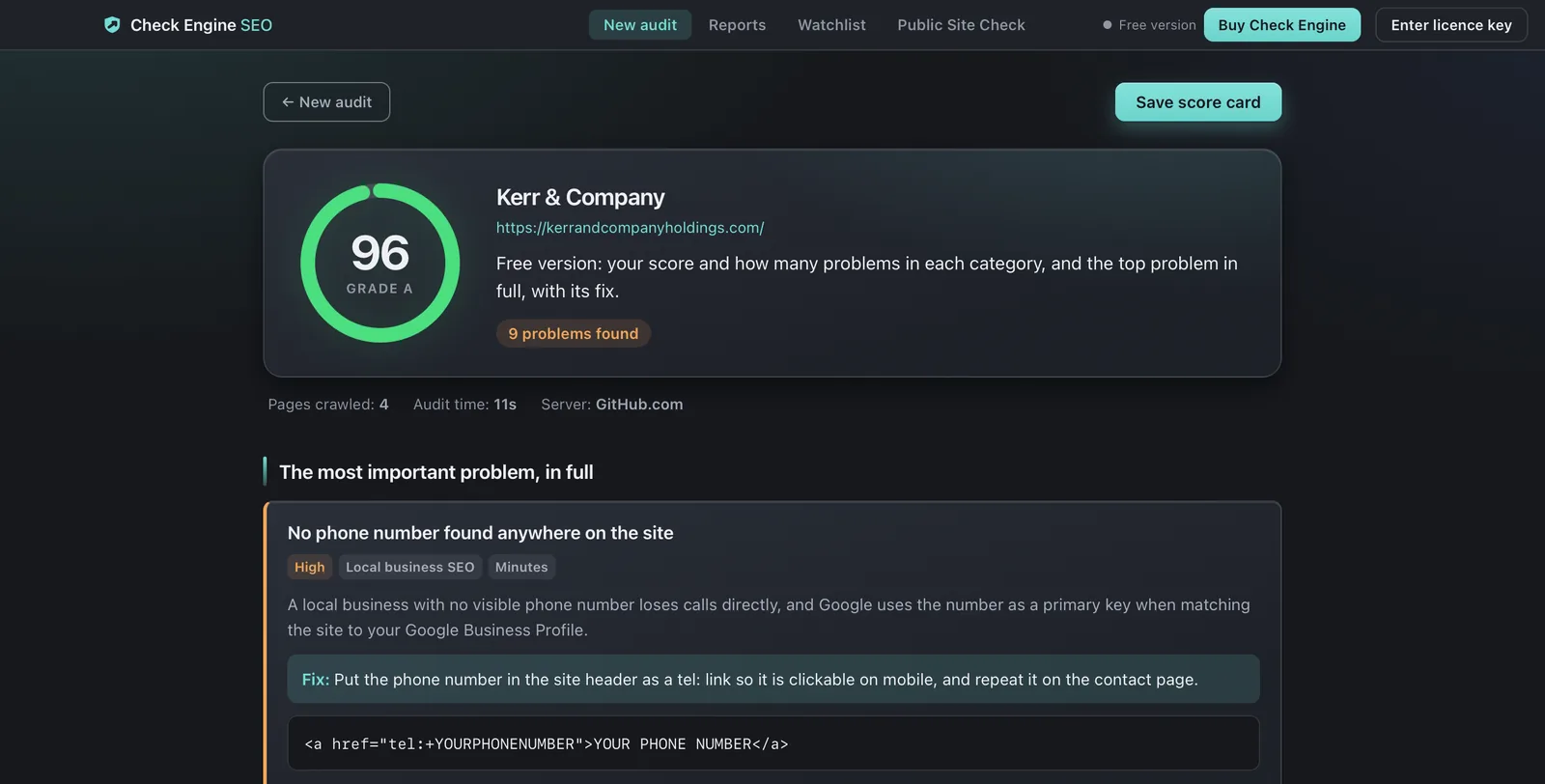
The first launch takes a few seconds longer than later ones. It used to say "while the engine unpacks itself". That was an explanation nobody had measured, and timing the engine out of the shipped bundle put its startup at a fifth of a second with no unpacking step to be found. The delay is real and the reason given for it was invented, so the reason is gone.
There is no security prompt to get past: the app is notarised, so macOS verifies it with Apple and opens it.
The command line
The same engine ships as a CLI, checkengine (the old name, docket, still works), inside the app bundle. It is the whole product, not a
cut-down version, and it has ten subcommands.
checkengine audit: the full audit
checkengine audit example.com
checkengine audit example.com -o audit.pdf -n 500
checkengine audit example.com --render 10        # run each page's JavaScript first
checkengine audit example.com --offline          # skip the five optional checks
checkengine audit example.com -f json --no-pages | jq '.score.overall'
It exits with status 2 when it finds a critical issue, so it can gate a deployment. Running
it in CI against a staging URL fails the build if someone ships a noindex, which
is a mistake that otherwise gets found weeks later by a traffic graph.
There is a full walkthrough for that on running Check Engine in a deploy pipeline, where the binary lives inside the bundle, a working GitHub Actions job, how long an audit actually takes, and what a macOS runner costs you per pull request.
--fail-on sets the bar. The default is critical, deliberately:
almost every real site has HIGH findings, and a gate that fails on ordinary work gets wrapped
in || true within a month.
checkengine audit https://staging.example.com --fail-on critical   # default
checkengine audit https://staging.example.com --fail-on high
checkengine audit https://staging.example.com --fail-on never      # report, never fail
Three exit codes, and they are a contract. A pipeline depends on them not moving:
| Code | Meaning |
|---|---|
0 | The audit ran and found nothing at or above the threshold |
1 | Check Engine could not run: bad arguments or a crash. A defect in the tool, not in your site |
2 | The audit ran and the result is bad |
A site that does not answer is 2, not 1: Check Engine ran fine, the site
was not there, and a staging URL that does not respond should stop a deploy. Keeping those
two apart matters more than it sounds. "Your site is broken" and "the tool is broken" need
opposite responses from whoever reads the log, and a gate that confuses them stops being
trusted.
That case took a real fix. Auditing a domain that does not resolve used to report three critical issues: that robots.txt blocked Googlebot, that the site was not served over HTTPS, and that no pages could be crawled. Only the last was true. There was no robots.txt and nothing was served, because there was no site. A DNS blip in a pipeline would have failed the build with two invented criticals and sent somebody hunting for a robots.txt problem that never existed. When nothing at all can be read, Check Engine now reports that and stops.
checkengine diff: what this deploy broke
checkengine diff https://example.com https://staging.example.com
checkengine diff https://example.com https://staging.example.com --fail-on medium
Audits both with identical settings and reports what the second one changed. This is the better deploy gate, and the reason is arithmetic: every real site carries standing findings, so a severity threshold tight enough to catch a regression fails every build, and one loose enough to pass catches nothing. A deploy is only answerable for what it changed.
Regressions are new findings and ones that got worse, such as a check that was MEDIUM
before and is HIGH now did not appear or disappear, and it is exactly what you want to know.
Improvements never fail a build, however many there are. The default threshold is
high rather than critical, deliberately: a standing HIGH finding is
somebody's backlog, and a HIGH finding that arrived with this deploy is this deploy's fault.
If the two crawls reach very different numbers of pages, Check Engine refuses to compare them and
exits 1, not 0. A build that goes green because the comparison was
impossible is worse than one that fails, because the team believes the gate ran.
checkengine logs: what Googlebot actually fetched
checkengine logs access.log
checkengine logs access.log.gz --url https://example.com
checkengine logs access.log --verify           # confirm the bot really was Google
A crawl tells you what a search engine could reach. A server log tells you what it
did reach, how often, and what it wasted requests on. Point Check Engine at a Common or Combined
format access log and it reports the response codes Google actually received, the paths it
fetched most, and how much of its budget went on redirects and errors. Add
--url and it crawls the site too, then shows the two ways the sets differ: pages
you link to that Google did not fetch in that period, and pages Google fetches that the crawl
never found: orphans, retired URLs still being retried, or sitemap-only pages.
A user-agent is a header anybody can send, and scrapers claim to be
Googlebot constantly. Everything is reported as "claimed" until you pass --verify,
which does the reverse-DNS-then-forward-lookup check
Google
documents. It is off by default because it is a DNS round trip per distinct IP. Lines that
are not in a recognised format are counted and reported rather than skipped, because a parser
that quietly drops a third of a file produces confident numbers about the rest.
Screaming Frog sells a dedicated Log File Analyser as a separate product at $139 per year, free up to 1,000 log events. It is a much deeper tool than this: a real interface, saved projects, and far more than a set difference against one crawl. What Check Engine gives you is the comparison that answers "is Google spending its time on my important pages", included in the one-time price rather than as a second subscription.
checkengine attack: where a competitor's authority does not protect them
checkengine attack yoursite.com theircompetitor.com
checkengine attack yoursite.com theirs.com --demand "emergency plumber"
Audits both sites, compares their link-graph authority, and returns the openings ranked by
how winnable they are rather than how large they are. An older, better-linked competitor is
unbeatable on the pages it has held for years and beatable on the ones it never wrote.
That distinction is the only part of a competitive analysis that changes what you do on
Monday. Add --demand and it pulls what people actually search for from Google's
public autocomplete, then reports which of those questions neither site answers.
checkengine backlinks: authority without a subscription
checkengine backlinks yoursite.com competitor.com
checkengine backlinks yoursite.com --referring
Domain authority from Common Crawl's public hyperlink graph, which ranks 134,979,706
domains in its August to October 2026 release. A large site's rank comes back in seconds; a small one
takes longer, and if it is outside the part of the ranks Check Engine reads, Check Engine says so rather than
inventing a number. --referring streams the whole graph, several gigabytes, to list the
domains linking in; it takes minutes and writes nothing to disk.
checkengine checks, serve, mcp, licence and version
checks prints every check the engine runs, grouped by area, with its id and title.
serve runs the local API the desktop app talks to, on 127.0.0.1, which is also
how you would drive Check Engine from your own scripts. mcp speaks the Model Context
Protocol over stdio, so an AI assistant can run audits and read kept ones
(the config to paste). licence --key activates this
copy and licence on its own shows its state. version prints the version.
Requirements and limits
- macOS 12 or later, Apple silicon or Intel for the desktop app, or 64-bit Windows (the installer is signed by Kerr & Company LLC).
- Linux x86_64 for the command line.
Download the 18.2 MB tarball. It needs
glibc 2.30 or newer. Check yours with
ldd --version. That floor is measured from the shipped binary rather than assumed from the machine that built it: the launcher itself only needs 2.14, and the bundled Python runtime is what raises it to 2.30. It is the same engine and the same checks, verified running in a clean container. Two things it is not: there is no Linux desktop app, only the CLI, and--renderdoes not work there. The renderer is a WebKit helper that exists only on macOS, so on Linux Check Engine reports that rendering was requested and did not happen rather than quietly skipping it. - An internet connection to the site you are auditing, and to our payment provider when the licence is activated and re-checked.
- Crawls are bounded by page count, depth, wall-clock time and response size. The defaults are deliberately polite; you can raise them.
What happens to your data
The crawl and every check run on your machine, and the crawl names itself as Check Engine in its user-agent. One check asks your homepage once as Googlebot and as each AI crawler that matters, with Check Engine's name added to every request, to see whether your server turns them away; the bot page lists them, and an offline audit sends none.
Five optional checks do reach out, and it is worth being exact rather than reassuring:
Check Engine asks your own server what it tells AI crawlers, refreshes its crawler knowledge file from
docketseo.app/data/knowledge.json, checks whether the email addresses you publish can actually receive mail,
fetches Core Web Vitals from Google PageSpeed Insights, and asks Google's public autocomplete
for topic suggestions. --offline, or the offline
tick in the desktop app, turns all five off and the audit still completes. The report then
says which checks did not run rather than quietly scoring them.
Check Engine also asks docketseo.app/updater.json when it opens, and every thirty minutes while it stays open,
whether a newer version exists, and tells you if there is one. It sends nothing but the request
itself, it never installs anything without you saying yes, and Check for Updates…
in the Check Engine menu does the same thing on demand. With the licence check, that makes two calls
it makes on its own, and a product that sells not phoning home should list both.
What never happens: no telemetry, no account, no analytics on you, and nothing about your site is sent anywhere for us to see. This page made a stronger, absolute claim until 2026-08-10; it was not true while those four checks were on by default, and it has been corrected rather than quietly dropped.
Audit history is stored in ~/.docket/ as plain JSON. Delete the folder and it
is gone.