Check Engine SEO in Claude and ChatGPT
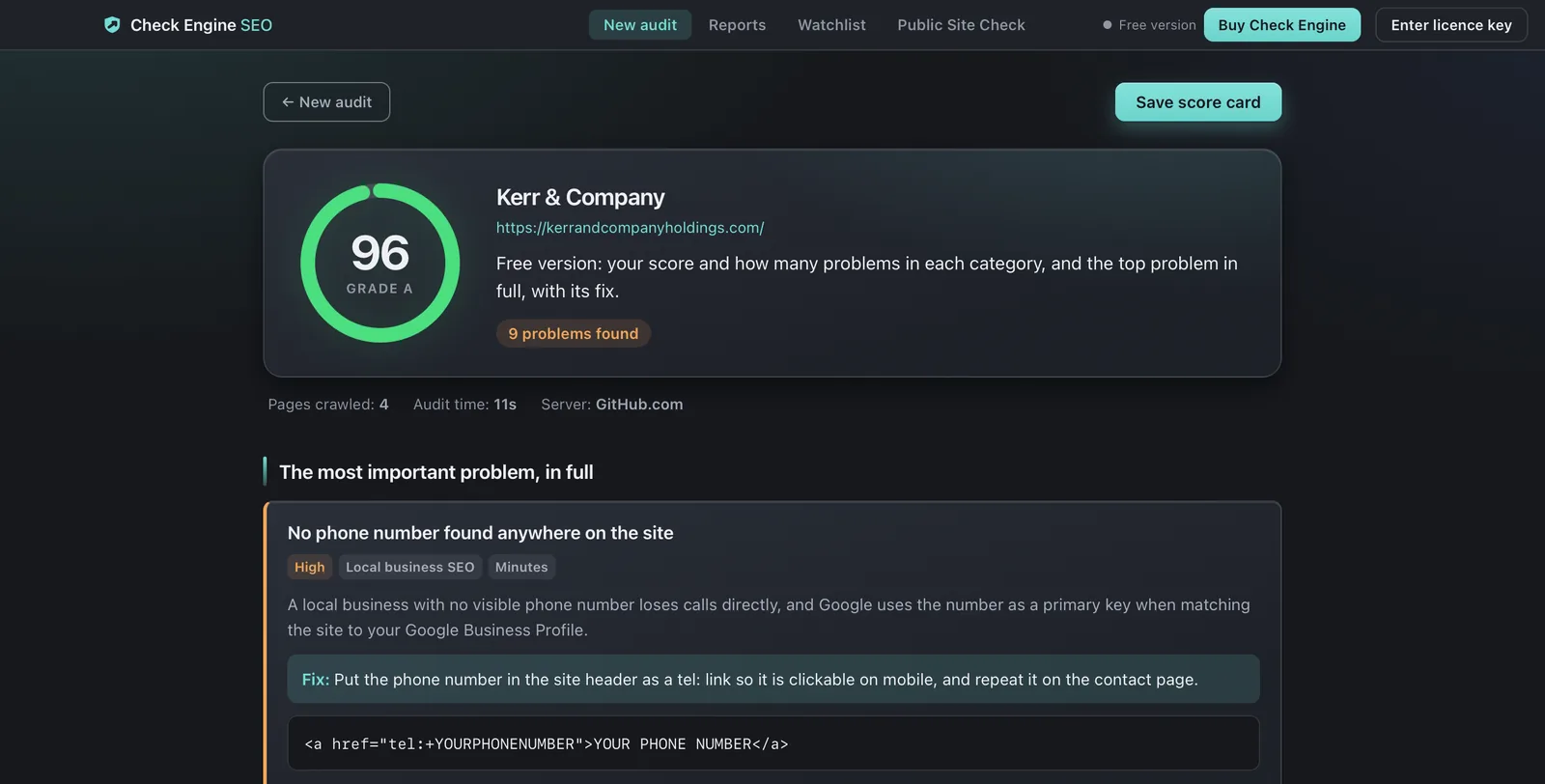
The Check Engine SEO connector checks one page at a time, free, with nothing to install. To check every page of a site, run Check Engine SEO on your Mac or PC. The free version crawls the whole site and shows your score, how many problems each area has, and the worst one in full with its fix.
$59once
For Macs with Apple silicon or Intel, macOS 12 or later, and 64-bit Windows
Priced in US dollars. Checkout shows your currency and any local tax.
On a Mac? Get the Mac version.
On your phone?
Launch price: $29.50 once, through 30 November. From 1 December: $59. Buy applies the code FOUNDINGDOCKET for you; if the checkout shows $59, enter it under ‘Have a discount code?’.
Screaming Frog is $279 a year. Ahrefs plans with Site Audit run $129–$449 a month. Check Engine is $59 once. Screaming Frog’s price read 4 November 2026, Ahrefs’ 9 November 2026.
30 days, no conditions, no questions asked. Refund policy
Checked 8 November 2026.
From one page to the whole site
| The connector in Claude | Check Engine, free | Check Engine, with a licence | |
|---|---|---|---|
| Pages | One per check | The whole site | The whole site |
| What it shows | Score, the problems on that page, the first fix | Score, problem count per area, the worst problem with its fix | Every finding, ranked, with the markup to paste |
| Runs on | Our server | Your computer | Your computer |
| Works in | claude.ai, Claude Desktop, mobile, Claude Code | The app, Claude Desktop extension, Claude Code | The same |
| Price | Free | Free | $59 once. See the licence and current price below. |
Claude Desktop: install the extension
Download the extension for your computer: Mac · Windows · Linux. Then, in Claude Desktop, open Settings, choose Extensions under Desktop app in the newer layout, click Advanced settings and then Install Extension, and pick the file. Leave the licence key setting empty for the free version, or paste the key from your Check Engine receipt for every finding. These steps are from Anthropic’s help page, read 8 November 2026.
Claude: add the connector, nothing to install
Check Engine SEO’s free checks also run as a connector on our server, so Claude can use them in a chat with nothing installed. It is listed in Claude’s connector directory; add it from there, or as a custom connector with this address:
https://mcp.docketseo.app/mcpThe same address works in other editors that speak MCP: Add to VS Code Add to Cursor
It needs no account and no key. Its five tools are read-only: a one-page SEO check with a score and the first fix, which AI crawlers robots.txt lets in, a redirect trace, an HTTP header check, and a search snippet preview. Try asking:
- “Check checkengineseo.com/pricing/ for SEO problems and tell me what to fix first.”
- “Which AI crawlers can read my site, and is anything blocking Claude or ChatGPT search?”
- “Trace the redirects from http://example.com and check its security headers.”
- “Will this title get cut off in Google: ‘Emergency plumber in Grand Rapids, open 24 hours a day’?”
The connector checks one page at a time. For a whole site, use the desktop app. What it sends and keeps is on the privacy page; questions go to support@docketseo.app.
Claude Code: one line
With the Check Engine app installed, run this in a terminal:
claude mcp add --transport stdio docket -- /Applications/Docket.app/Contents/Resources/docket/docket mcpOn Windows the engine is C:\Users\YOU\AppData\Local\Docket\docket\docket.exe, with your own account name for YOU. The
syntax is from Claude Code’s MCP documentation,
read 8 November 2026: everything after -- is the command that starts the server.
ChatGPT: the desktop app
The ChatGPT desktop app can start a local MCP server. Add one, choose STDIO, and give it the same engine
path with the argument mcp. This local setup does not work in ChatGPT on the web, which only
reaches servers on the internet. The full
setup guide has OpenAI’s wording and every tool’s options.
What the free version returns
On 8 November 2026 we took the released 1.3.159 Mac extension, started it the way Claude Desktop does
with the key setting empty and a fresh home folder, and asked it to audit docketseo.app, this site's address until November 2026. It
answered in 13.7 seconds with a score of 99.4 (A),
4 problems across 12 areas, and the top one in full: “3 groups of near-identical colours in your CSS”,
with where it is and the change to make. Its tool list also offers
get_last_report, explain_finding, compare_audits, list_checks; the three that read kept audits have nothing to
read until a copy is activated, because a free audit is not kept.
With a key, the same question returns every finding, ranked, with the markup to paste, from the same 99 checks the app runs.
How it was tested
- Claude Desktop’s extension: the released file, started exactly as its manifest tells Claude Desktop to start it, on this Mac on 8 November 2026, and on a clean Windows machine when it shipped. The clicks inside the Claude app are Anthropic’s.
- Claude Code and ChatGPT: the command is the one the extension runs. The client syntax is from each maker’s documentation, not run here.
- Local audits stay on your computer. The app and extension do not upload them to us. The remote connector runs its checks on our server. What an audit does contact, and how to turn the optional parts off, is on the privacy page.
What a Check Engine SEO licence includes
A licence unlocks every finding from the app’s 99 checks, ranked, with the markup to paste. It also unlocks the full result in the Claude Desktop extension and the local engine used by Claude Code. Those audits run on your computer. The remote connector’s five free checks need no licence.
The licence is $59, paid once. No subscription. Launch price: $29.50 once, through 30 November. From 1 December: $59. Buy applies the code FOUNDINGDOCKET for you; if the checkout shows $59, enter it under ‘Have a discount code?’.
Missing a check?
Ask for it on the public issue tracker, or report a problem there. Please leave private site details out of a public issue.
Related
- Every tool and option, in full
- Which crawlers feed Claude’s web search?
- Free SEO checker, in your browser
Common questions
Can Claude audit my website?
Yes. The free connector checks one page on our server. For a whole site, install the Claude Desktop extension or add Check Engine to Claude Code; that audit runs on your computer.
Does Check Engine SEO work in ChatGPT?
In the ChatGPT desktop app, which can start a local MCP server. Not on the web, which only reaches servers on the internet.
Is the Claude extension free?
Yes. Without a key it returns the score, problem counts by area and the top problem in full. A key from a Check Engine purchase unlocks every finding.